Back
Read all

Smarter workflows for institutions, vendors, and admins—built for speed and operational trust.
Figma, Notion

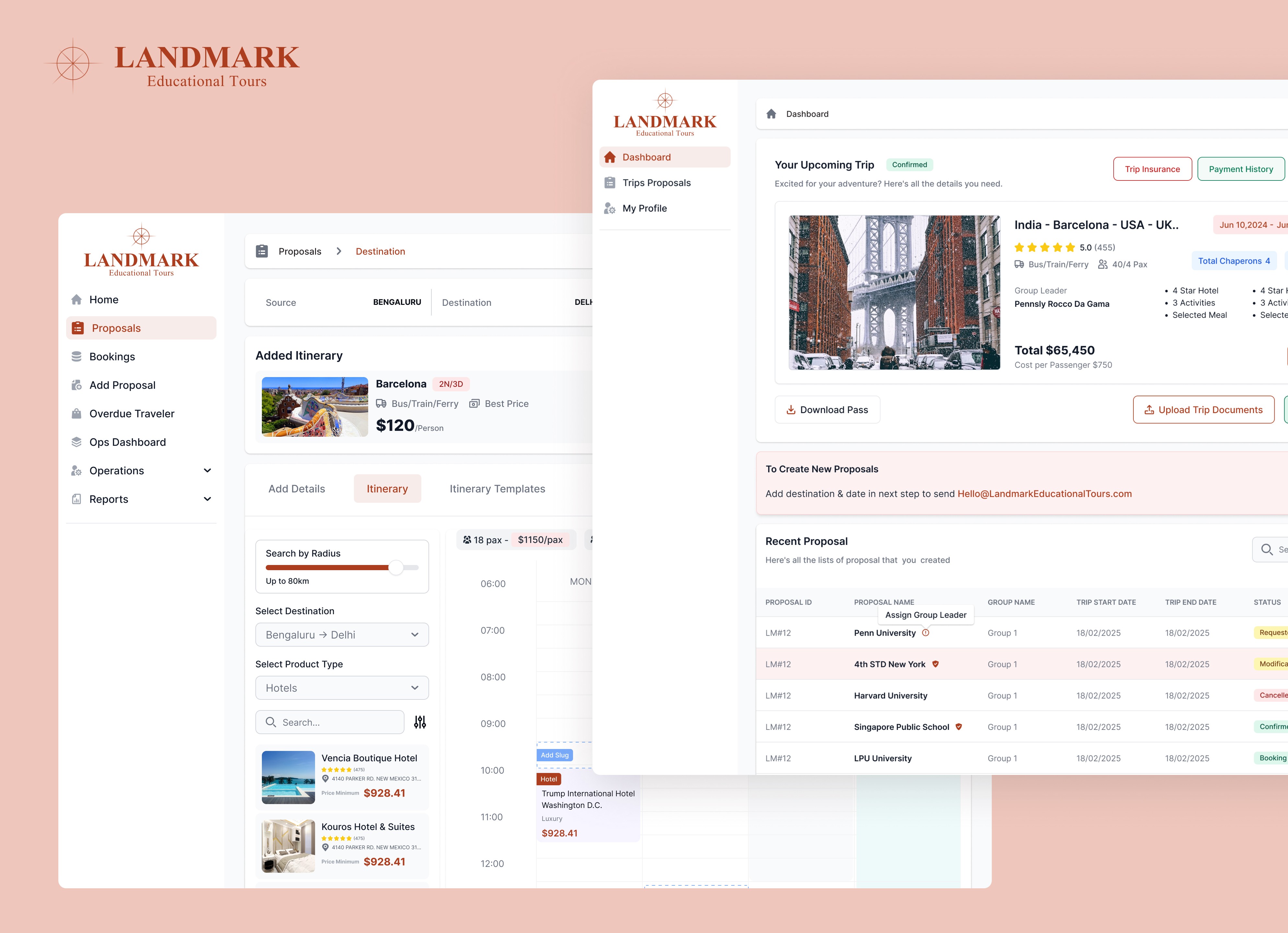
The Challenge
Planning educational tours often involves:
Endless back-and-forth communication between institutions & vendors
No centralized system for managing itineraries, cost estimates, and approvals
Difficulty in tracking participants and supervisory roles
Lack of transparency in vendor offerings and sales
We needed to build a platform that connects all stakeholders, streamlining the process while ensuring clarity, accuracy, and efficiency.
Measurable Outcomes
Even in beta version, Landmark showed measurable improvement:
📌 Quantitative
40% faster trip planning
30% more accurate student/chaperone ratio forecasting
2.5× increase in vendor engagement
Admin query volume dropped 22%
📌 Qualitative
Vendors reported “much clearer requirements”
Institutions reported “no manual back-and-forth”
Admins appreciated “predictable, trackable workflows”
Market Opportunity
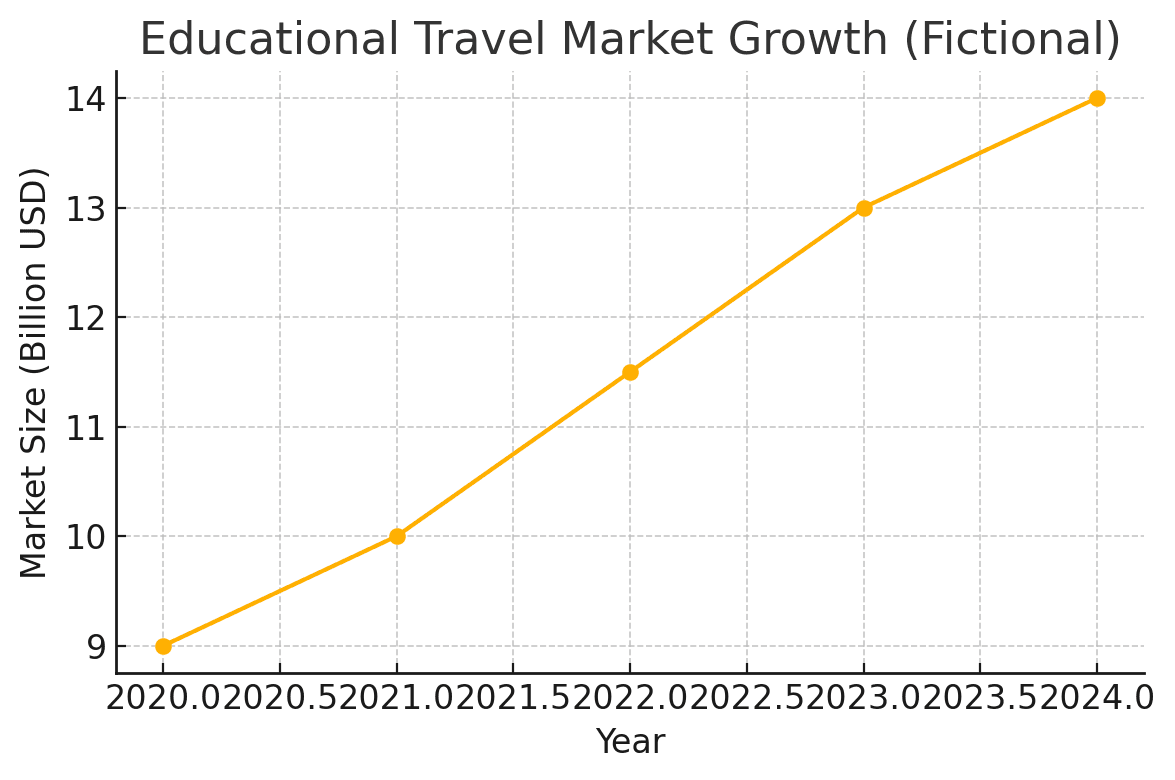
The educational travel market has grown steadily over recent years, crossing an estimated $14B globally. This rising demand highlights the need for scalable, efficient planning tools for institutions and vendors.
Stakeholder Mapping
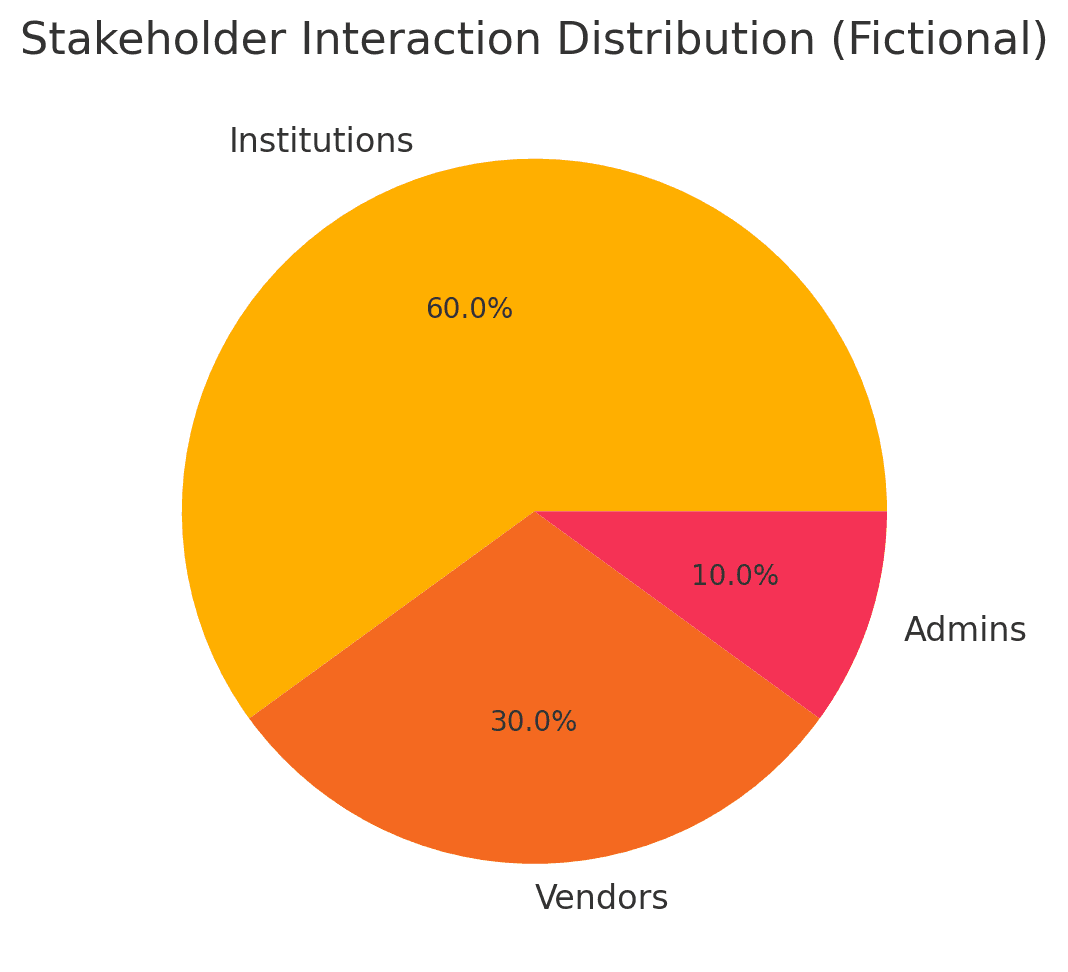
Landmark serves a multi-role ecosystem where institutions drive most interactions, vendors handle operational fulfillment, and admins ensure oversight. The UX needed to balance clarity across all three roles.
Research & Discovery
Stakeholder Interviews – Managers from schools/universities, travel vendors, and admin operators.
Pain Points Mapped – Slow coordination, unclear requirements, lack of digital workflows.
Competitive Analysis – Compared with generic travel booking platforms (TripAdvisor, MakeMyTrip) & found niche gap for educational travel.
Multi-Role Based Platform
Institution Managers (Schools/Universities)
Create trip proposals with student, leader, and chaperone details
Get automated cost estimations
Request & Communicate with vendors directly
Vendors (Hotels, Food, Travel, Attractions)
Register
List offerings
Receive & Manage bookings requests
Admins
Manage vendor approvals & institution accounts
Track sales
Manage access levels— Full system visibility
Each role needed its own dashboard but a shared mental model.
Before → After: UX Transformation
The legacy experience was functional but fragmented — heavy tables, low hierarchy, and no workflow cues made daily operations slow and error-prone. The redesign transforms raw data views into structured, task-first interfaces built for clarity, speed, and scale. Each improvement directly addresses a real friction point, resulting in a more intuitive and operationally efficient platform.
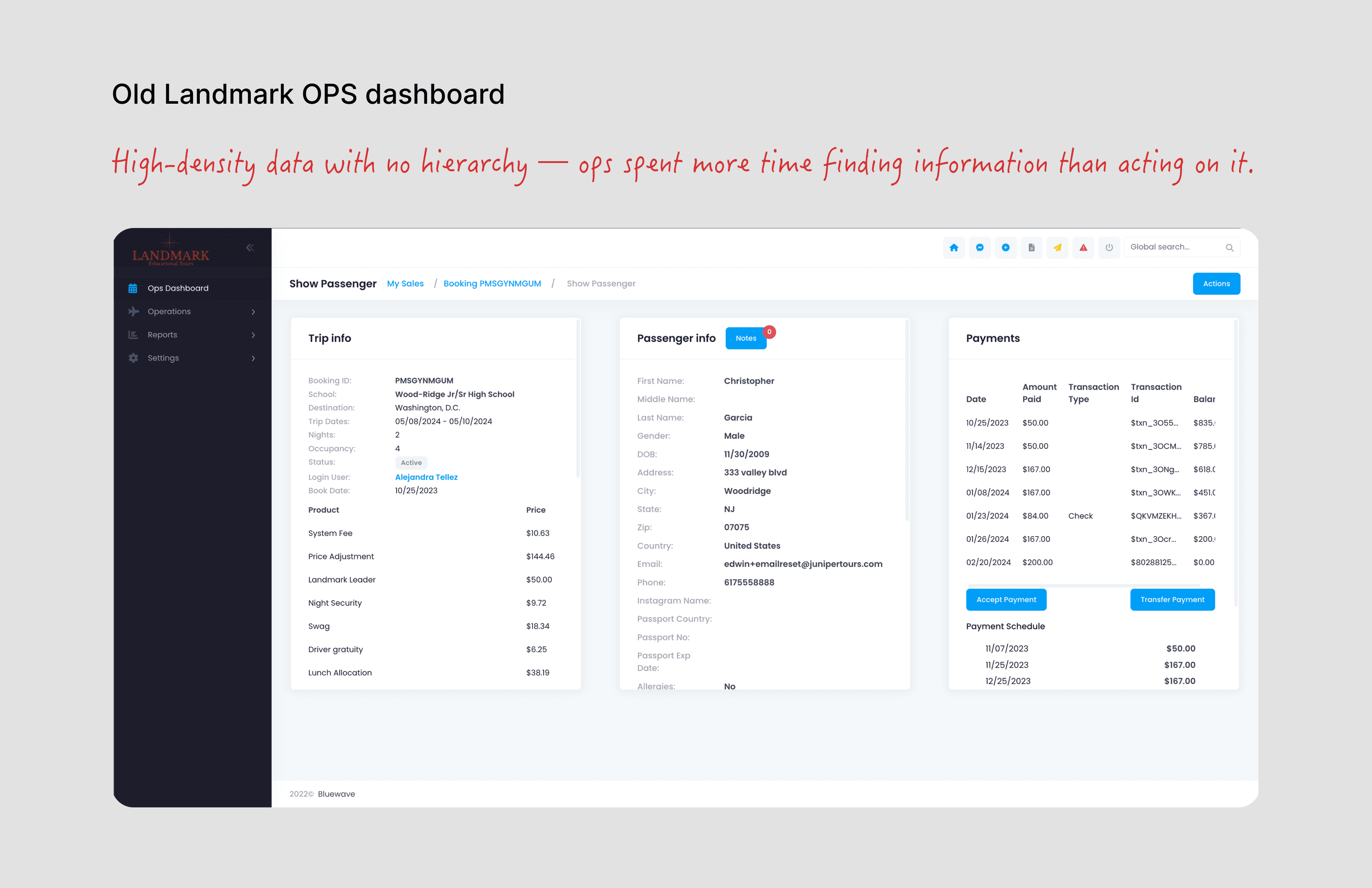
Ref. Image: Old Landmark Ops Dashboard
Before — High cognitive load. No prioritization. Raw data over workflow.
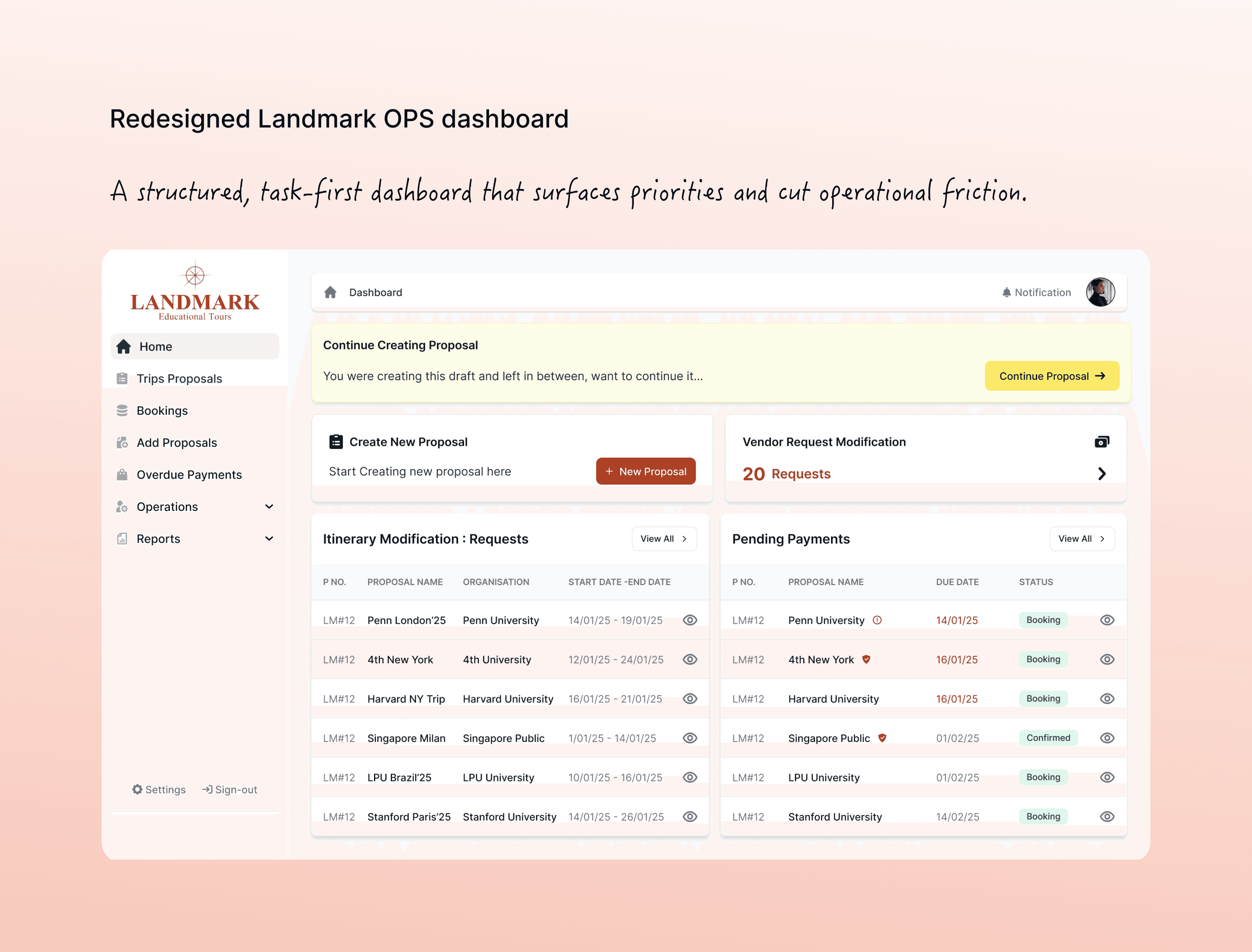
Ref. Image: New Redesigned Landmark Ops Dashboard
After — Structured workflow. Clear priorities. Faster actionability.
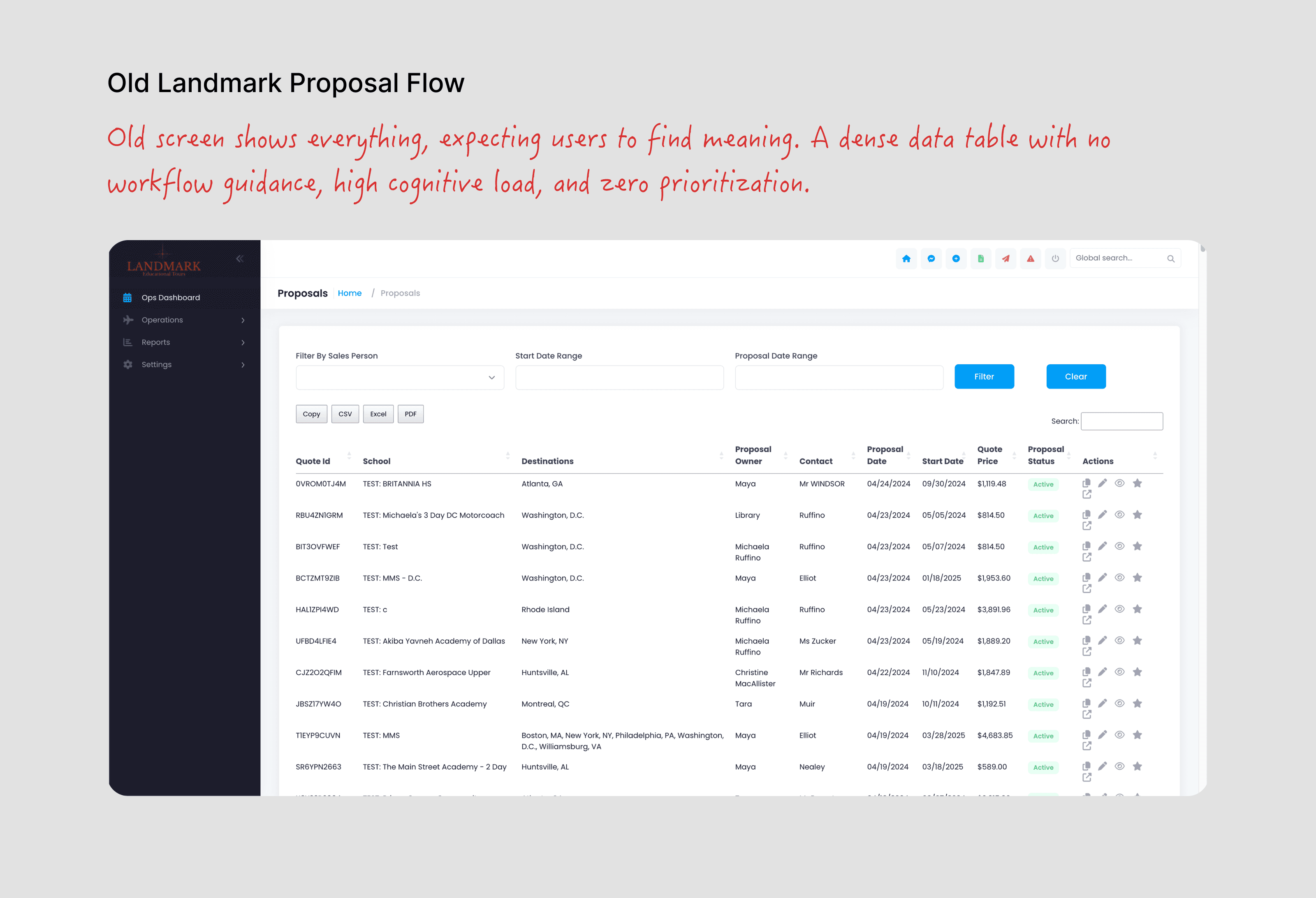
Ref. Image: Old Landmark Proposal Flow
Before — Made users chase information. And tables are efficient for storage, not action.
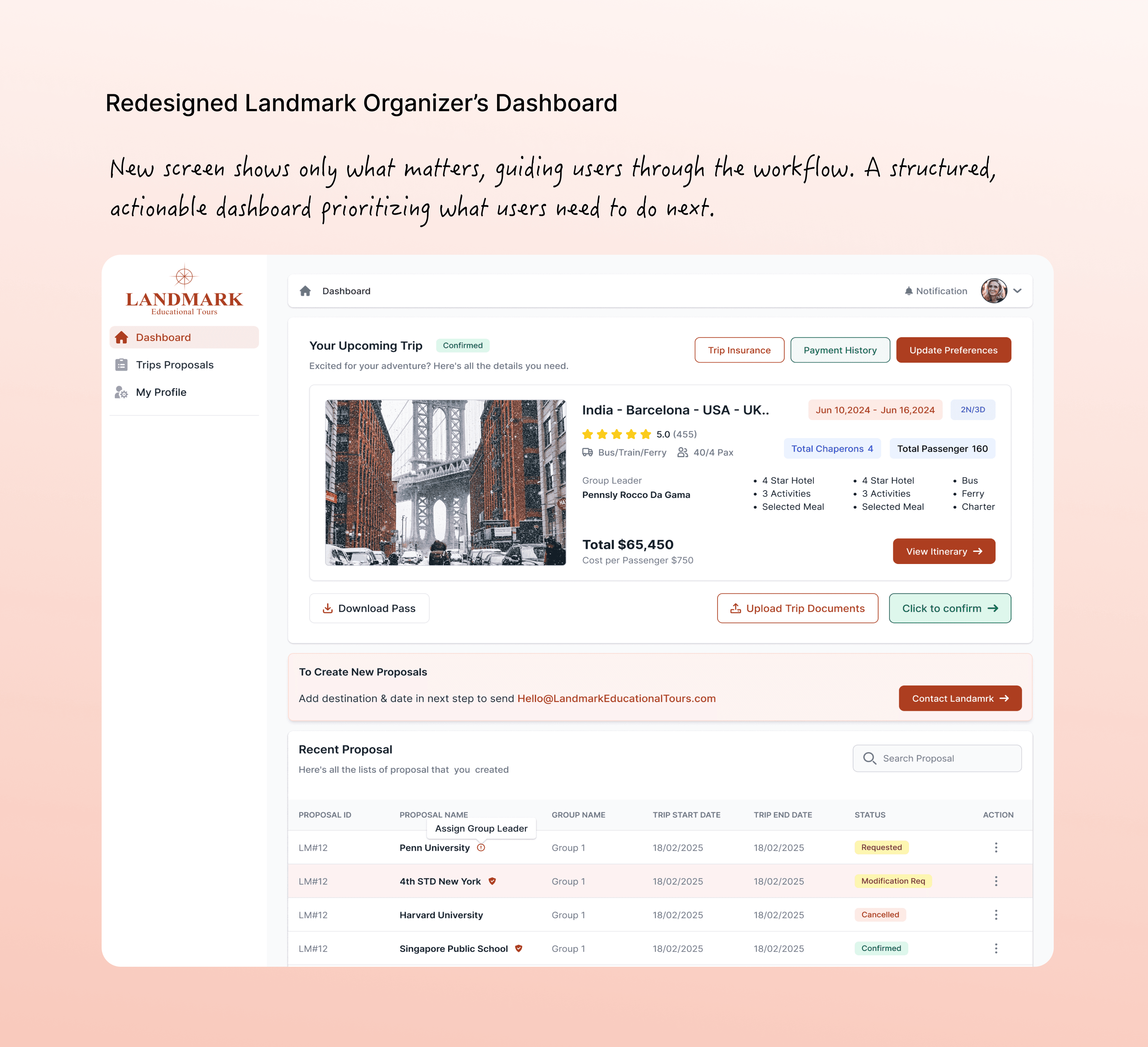
Ref. Image: New Landmark Organizer's Dashboard (along with proposal flow)
After — New dashboard surfaces tasks before they’re even needed. Cards + grouped tables = context + clarity + speed.
Key Features
For Institutions
Trip Creation Wizard – step-by-step trip planning
Auto Headcount Estimation – number of students, leaders, and chaperones
Vendor Matching – find relevant services instantly
For Vendors
One-click product listing
Package customization (pricing, description, add-ons)
Order management dashboard
For Admins
Multi-role access control
Sales overview & reporting
Vendor & institution approval system
High-Fidelity Design · Key Workflows Reimagined
A few of the most impactful flows redesigned to bring clarity, structure, and speed across Landmark’s multi-role platform.
Edit Requests — Smart Pricing & Operational Clarity
This redesigned screen simplifies how operations teams review and edit service requests.
Key improvements:
Clear cost breakdowns with impacted price & margins surfaced in-line
Structured form layout that groups vendor, cost, dates, and additional details
Predictive fields reducing manual errors
Single CTA (“Initiate Request”) to create a focused workflow
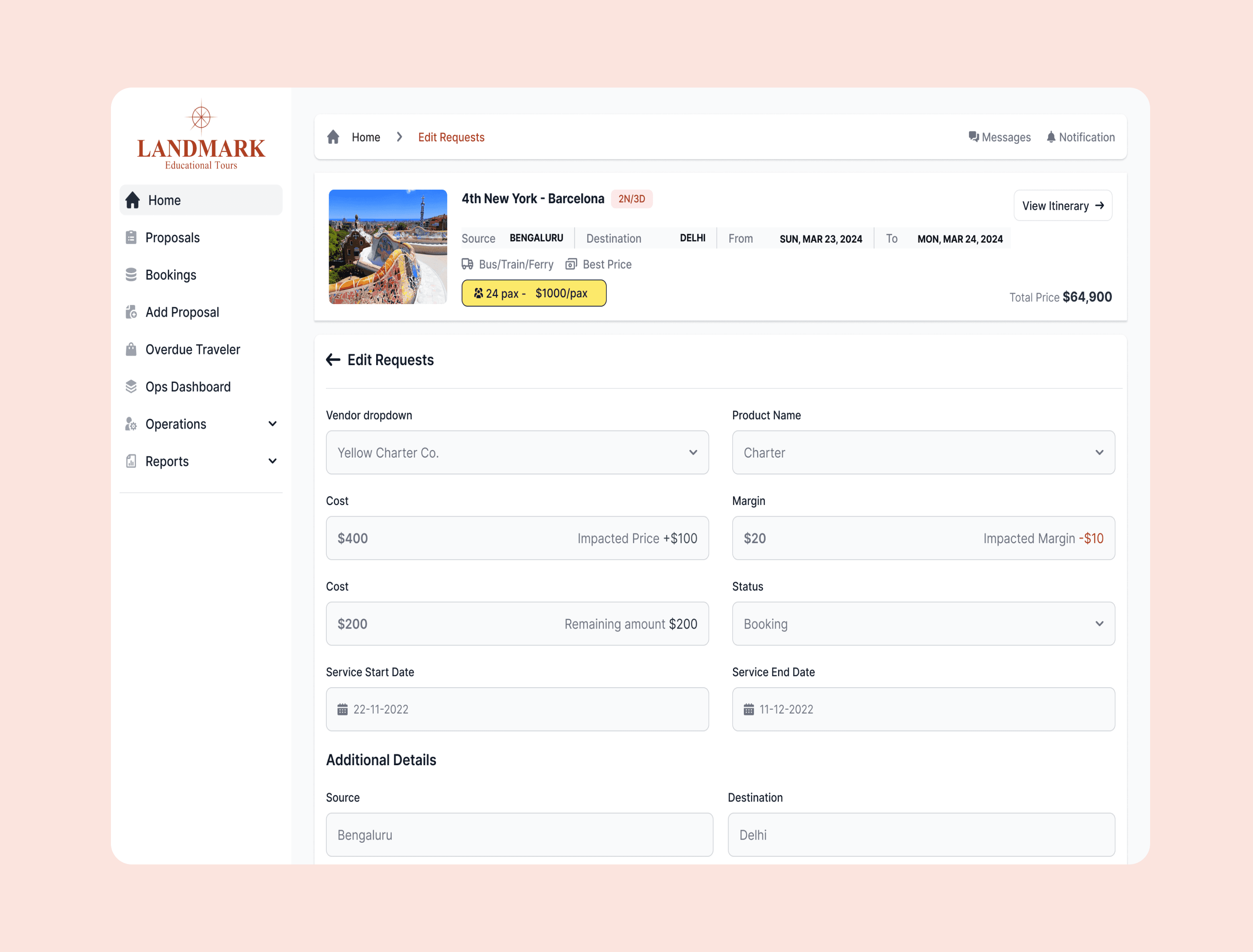
Ref. Image : Redesigned Edit Request Screen
“Redesigned for clarity—faster edits, fewer errors in request handling.”
Proposal Overview — Humanized Trip Summary & Actions
This high-fidelity proposal screen reframes information around what the user needs to do next.
Key elements:
Trip summary card with dates, activities, ratings, and a single CTA (“View Itinerary”)
Quick-access actions like insurance, preferences, and document upload
Recent proposals list with status-driven color tags (Requested, Cancelled, Confirmed)
Cleaner hierarchy supporting quick decision-making
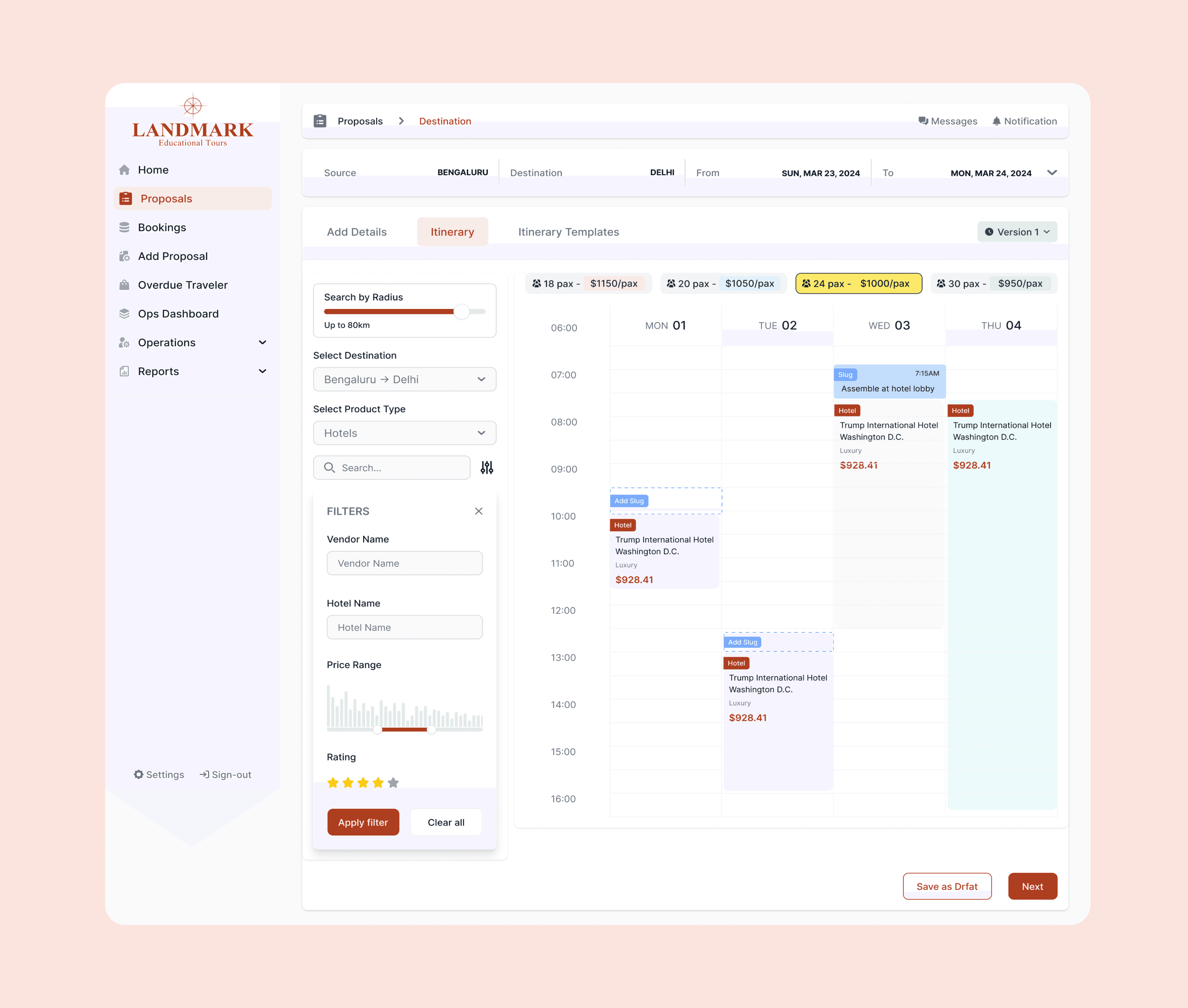
Ref. Image : Proposal Overview Screen
“A task-first proposal view that makes complex trips easy to understand and act on.”
Itinerary Builder — Calendar-Based Scheduling
The itinerary planner introduces a visual scheduling experience—a major UX upgrade from table-based planning.
Highlights:
Calendar timeline layout: Hotels, charter, meals, activities shown as movable blocks
Side filters (destination, product type, vendor, price, rating) to refine options quickly
Version control for editing iterations
Multi-pax pricing tags helping compare packages instantly
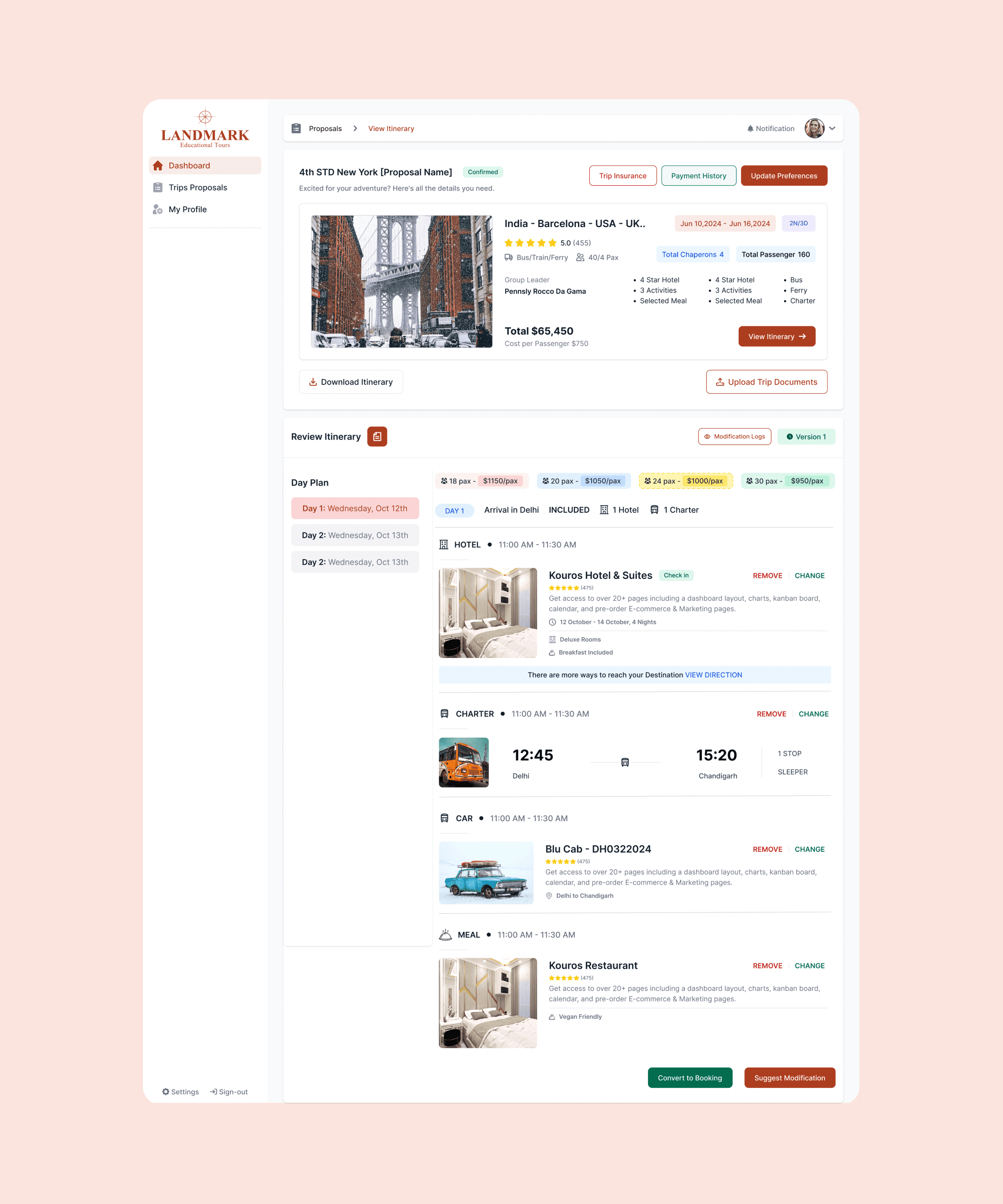
Ref. Image : Itinerary Builder
“A visual planner that transforms itinerary creation into a fast, intuitive drag-and-drop flow.”
Vendor Dashboard — Operational Control & Revenue Insights
This dashboard provides vendors with a clear operational snapshot, boosting transparency and decision-making.
Key improvements:
Revenue analytics surfaced at the top
Expiry alerts for product prices & requests
Pending tasks grouped by urgency
Upcoming bookings for quick prep
Modular cards for cleaner navigation
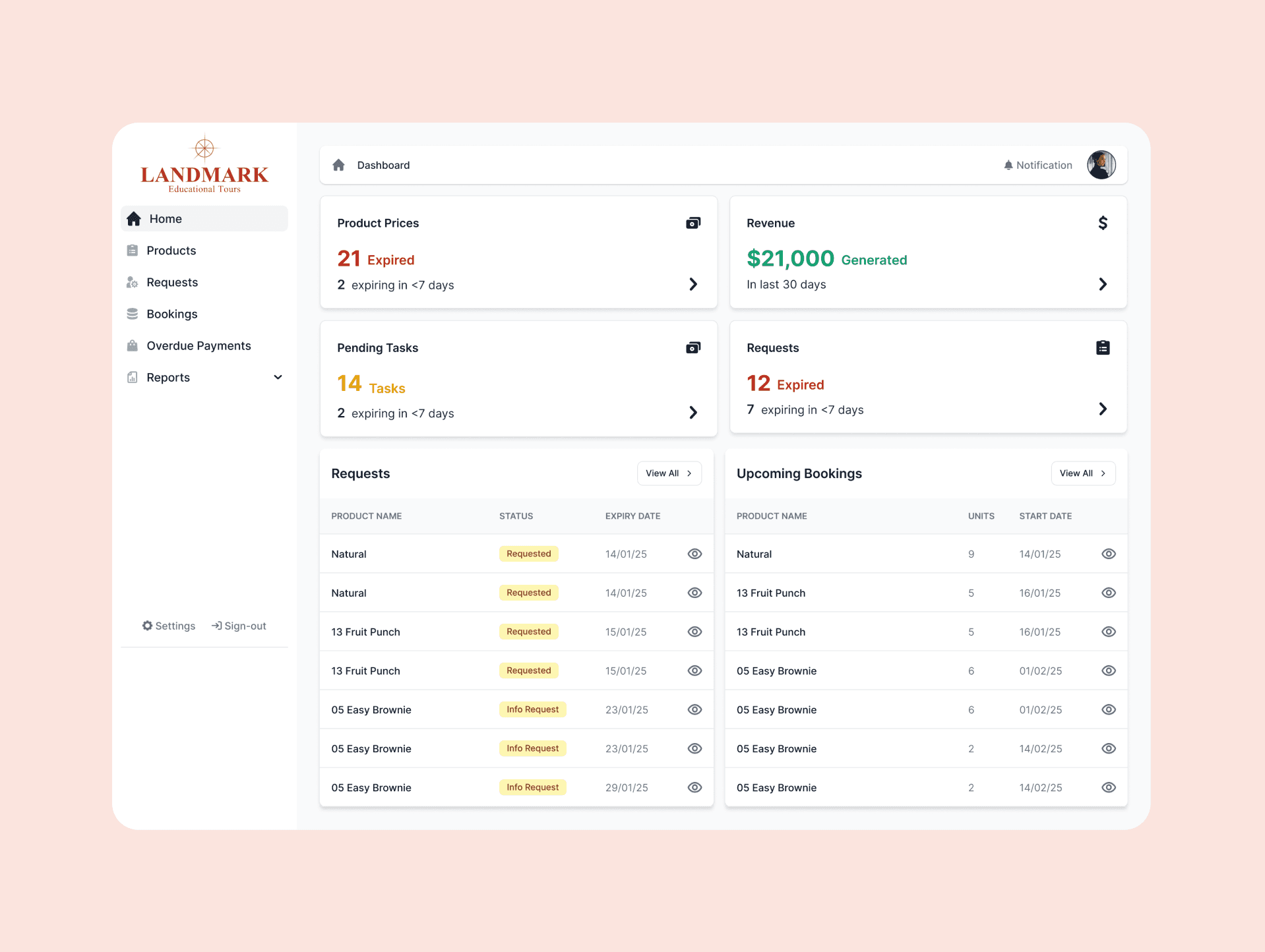
Ref. image : Vendor dashboard
“A vendor-first dashboard that surfaces insights, tasks, and bookings in a single glance.”
Impact & Outcomes
Reduced trip planning time by ~40% for institutions
Increased vendor participation by 2.5x within the first month of beta launch
Positive feedback from admins on ease of oversight
Conclusion
Landmark bridges the gap between educational institutions, vendors, and admins, offering a centralized, transparent, and efficient way to plan and execute educational trips.
It’s not just about booking a trip – it’s about building memorable, well-organized educational experiences.
Next work
Explore more
works.
View all
View all